Permissions Manager
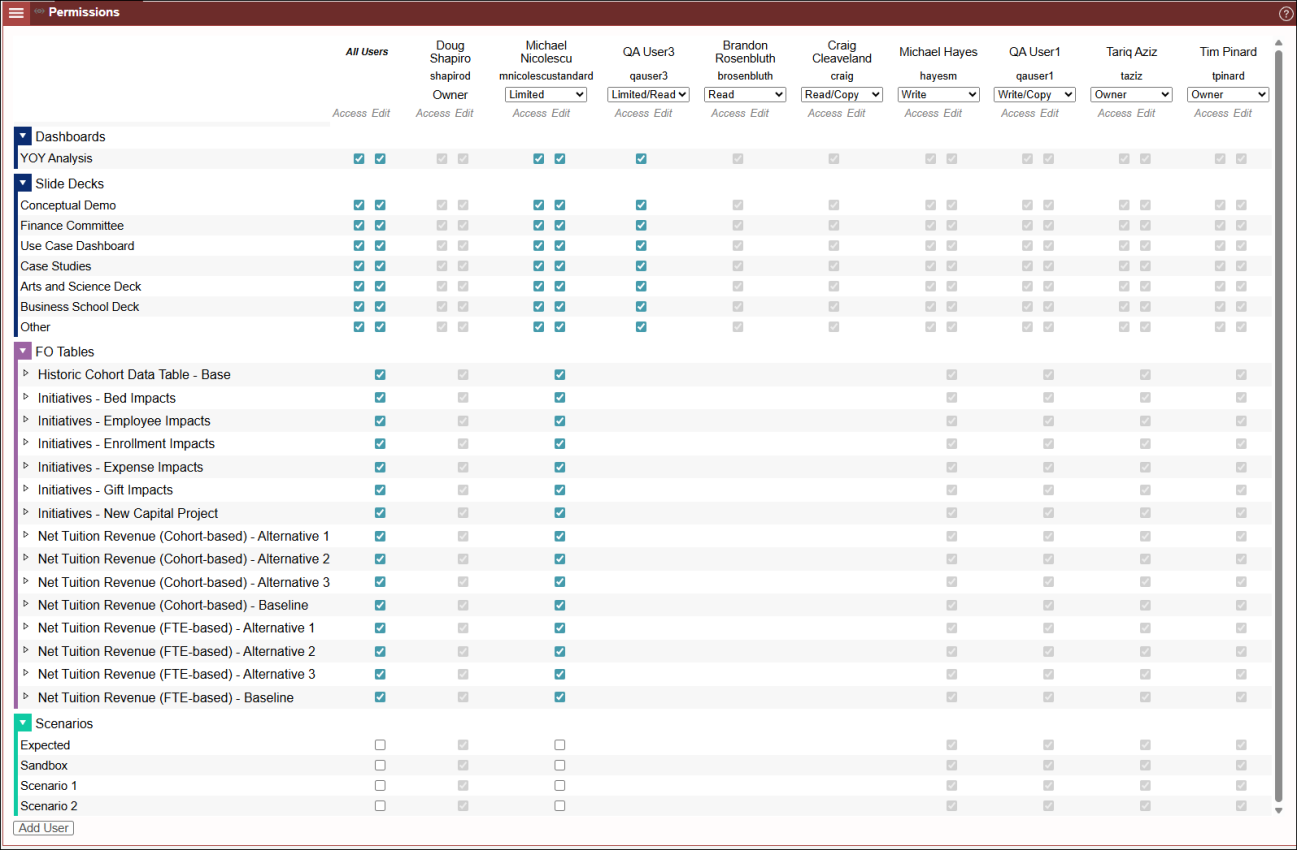
To add and manage model permissions such as who can access, read, copy, or edit your model, and available objects such as Dashboards, Slide Decks, FO Tables and Scenarios, the Model Owner uses Permissions Manager located under Model Settings. Once opened, you can easily expand or collapse the object groups to set Access or Edit permissions.
Providing Model Access
To add users to your model, click the Add User" button located on the bottom left corner of the panel. Click the button and select users in the drop-down list to share your model with and give appropriate model and object permissions. When you add a user to share your model with, you select a permission type as described below. When a user is added, it creates a new permissions column.
To view more options for providng model access, view the Sharing a Model.
Permission Types
Synario offers a variety of permissions types. You can modify a user's access type via the drop down menu located at the top of the panel, below the user's username. The available permission types fro a user, depend on the user type - e.g. Power User or Standard. Depending upon the permission type select, a default set of permissions is applied or you may be able to selectively apply or remove individual object permissions. Default permissions are granted or can be selectively added or removed, depending upon the Access type. The first column - The "All Users" column can be used to grant or remove editable permissions across all added users shown in the columns to the right.
None - Removes permissions for the user. When "none" is selected, the column for that user will be removed from Permissions Manager.
Limited - Default Access and Edit permissions to Dashboards and Slide Decks and Edit Access to FO Tables. You can selectively add access to Scenarios. You may selectively remove individual object access.
Limited/Read - Default Access to Dashboards and Slide decks. You can selectively remove access to individual Dashboards or Slide Decks.
Read - Available for Power Users only. Read only permission to Model, Dashboards, and Slide Decks. Individual object permissions are non-editable.
Read/Copy - Available for Power Users only. Read only permission to the Model, Dashboards, and Slide Decks. Individual object permissions are non-editable. Grants users ability to make a their own copy for which they will be Owner.
Write - Available to Power Users only. Grants full write permission to all objects. . Individual object permissions are non-editable. Model copies are not allowed.
Write/Copy - Available to Power Users only. Grants full write permission to all objects. . Individual object permissions are non-editable. Users can copy of the model for which they will be Owner.
Owner - This makes the user a co-Owner of the Model. Note: Only the primary Model Owner who created the model can delete the model.