Java Functions
Java functions are only available to users with appropriate access privileges.
Java functions provide direct access to the Java programming language to create highly custom functionality for creating functions that can be used in formula layer expressions. Java functions should be written by skilled Java programmers. We provide consulting services to help create the custom Java functions you need.
To create a Java Function:
- Create (or copy) a Java Function in Model Infrastructure / Shared Layers
- Add the appropriate Java Function Parameters
- Add the Java Function Body (if there are compiler errors they will be reported immediately)
- Test and debug until correct (using Java Function Trace Reports if needed)
- The Java function is now available in any expression of a formula layer.
Simple Mathematical Function Example
The normsdist function is already provided as a built-in function, which is defined as the cumulative normal distribution with mean of 0 and a standard deviation of 1. Suppose you needed instead the probability density function and wanted to pass the median and standard deviation as additional parameters. First create a new Java function. The title could be "Normal Probability Distribution Function", but the function title cannot have spaces and could be shortened to something like "npdf". It has 3 parameters, all of type Double as follows
- x - the input value
- mean - the mean of the normal distribution
- std - the standard deviation of the normal distribution
After the 3 parameters have been added, the Java function code body can be added. We will use the Apache commons Math package which is already included in the software as part of the Monte Carlo simulation. The Java Function panel will look something like:
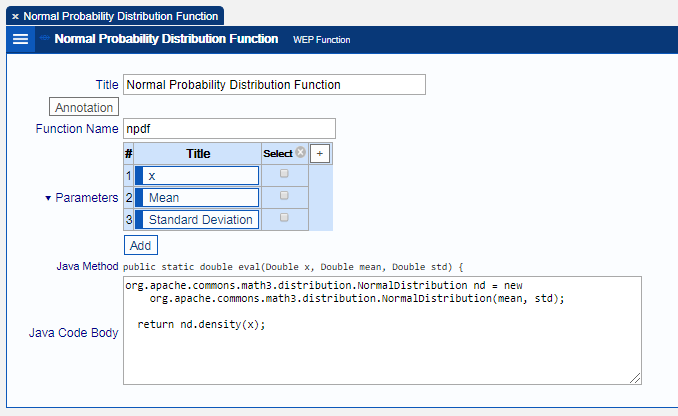
Once the function npdf is created, it can be used in expressions, like any other expression function.
Java Function Parameters
A Java function may have any number of parameters. Each parameter must be uniquely named and have one of the following types:
- Double - a simple numeric value (Double means a 64 bit floating point approximation of a Real number)
- String - a sequence of characters
- LineItem - a line item from the model (passed by appending "_lineitem" to let variable name)
- LineItemSet - a line item set from the model (passed by appending "_lineitemset" to let variable name)
- Group - a group from the model (passed by appending "_group" to let variable name)
- Context - information about the evaluation including the current period, destination line item and much more (passed by the reserved name "context")
- Object - an arbitrary object
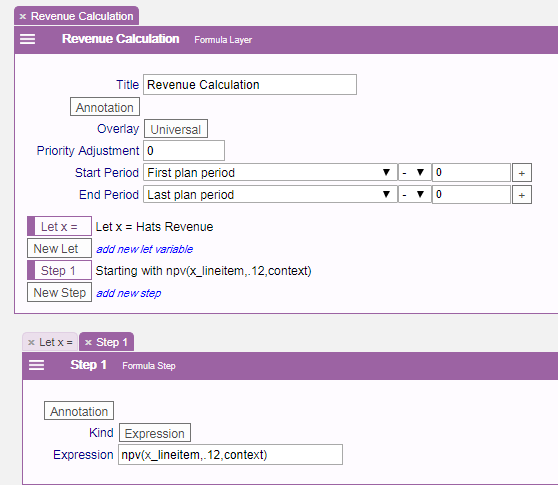
Normally, Let step variables are Double values for each period. For example, the let statement with variable name x referring to the line item "Hats Revenue" represents the revenue for the "current period" for each period of computation. But sometimes one would like to pass the line item associated with the let statement, rather than a single period value. To pass the line item associated with a let variable, the variable name "x_lineitem" is used. The Net Present Value function described below shows an example of this.
Context Parameter
The context parameter is a special parameter that can be passed to any Java function and is used to retrieve or compute information from the model. The context represents the interface (sometimes called an API) between the software and Java functions and is described in the Java Docs. The context parameter can be used to:
- get the current period of evaluation
- get the destination line item
- get the periods per year (of the model)
- get the value of a line item, line item set or group for any period
- get FO Attribute values
Net Present Value Function Example
The net present value of an income stream cannot be computed by looking at one period's value at a time, so we pass a line item rather than a value. In addition to the line item we must also pass the discount rate and the context. The Java function for computing net present value is:
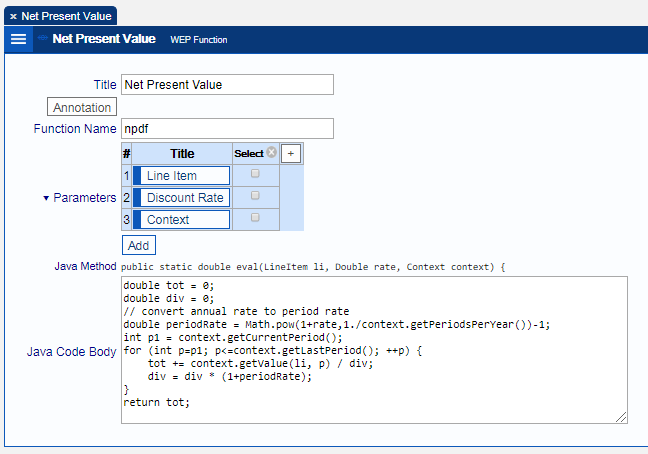
NPV Function notes:
- In line 4, the annualized rate is converted to a periodic rate. The context is used to determine the number of periods per year so that this function can be safely reused in other models that might have a different number of periods per year.
- In line 5, the starting period is determined from the context. The net present value is a computation on all future values starting with the current month.
- In line 6, a Java for loop is used to compute each period's contribution to the net present value, starting with the current period and going through to the last period of the model (also determined from the context).
- In line 7, the line item's value is computed for period p using context and is appropriately discounted by dividing by the divisor, div.
To use the npv function in a formula layer, the first parameter must be passed as a line item rather than a single Double value. To do this the variable "x_lineitem" is used to refer to the line item associated with let step variable x (which in the example below is Hats Revenue).
Java Function Trace
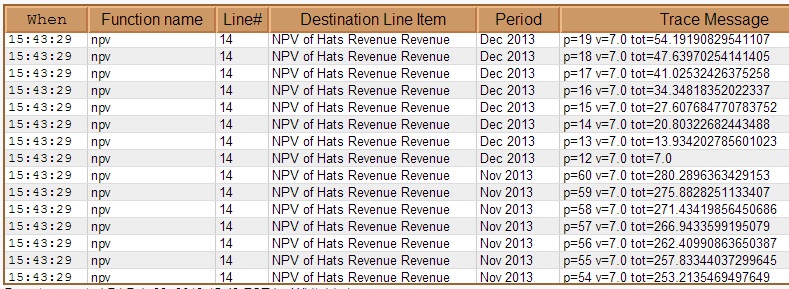
Java function trace reports can be used to debug Java functions. To output a trace message, use the Context trace method. For example, to see the intermediate computation results in the above npv computation you can do the following:
double tot = 0;
double div = 1;
// convert annual rate to period rate
double periodRate = Math.pow(1+rate,1./context.getPeriodsPerYear())-1;
int p1 = context.getCurrentPeriod();
for (int p=p1; p<=context.getLastPeriod(); ++p) {Double v = context.getValue(li, p);
tot += v / div;
context.trace("p="+p+" v="+v+" tot="+tot);div = div * (1+periodRate);
}
return tot;
When npv is used on a Hats Revenue line item with a value of 7 per period, the following trace excerpt is produced.
Java Function Limitations and Restrictions
The Security Manager does not allow user code to use any unsafe or sensitive method including such things as:
- file operations
- reflection API
- read/write IO
- thread or thread group operations
- socket operations
- class loader operations
In addition, a special class loader is used to prevent direct access to the software code to prevent accidental or purposeful misuse. All interactions with the software must go through the API (as specified in the Java Docs. User code may throw exceptions, in which case the evaluation process continues with NaN (Not a Number) value. If user code inadvertently goes into an infinite loop or is taking a long time the user can cancel the computation.