Iterative Calculations
Iterative Calculations can be added to any formula layer. Iterative Calculations can be used to
- Solve circular references
- Solve goal seek problems
To turn a formula layer into an iterative calculation, click on the Add button in the menu bar of a formula layer and add an iterative calculation selecting the type of problem you are trying to solve. After adding the iterative calculation, parameters will be added that allow you to control how the iterative calculation is performed.
An iterative calculation begins with an initial guess. A calculation is performed and checked against the goal. A new (and hopefully better) guess is made. This process is repeated until the guess is found with the required precision or the maximum number of iterations is reached. The parameters governing the iterative process include:
- Iterative method: choose one of the following methods (also see below for determining which method is best)
- Fixed point method
- Secant method
- Switchable fixed point and secant - if a method is failing to converge, switch to another method
- Simultaneous fixed point and secant - use both methods and select the better guess at each iteration
- Newton's method with numerical differentiation
- (Goal Seek only): Goal Seek Value: specify a value (e.g. zero for break even analysis)
- (Goal Seek only): Round solution value to nearest: specify the granularity of the found value (e.g. set to 1 to round to whole number of units). Set to zero to find an exact solution (with precision specified by the next parameter).
- Precision: specify the precision required of the solution (not used when rounding a solution)
- Initial Guess: Iterative methods typically begin with some initial guess or "seed" value. Sometimes it is possible to find alternate solutions with different initial values.
- Lower Bound: specify the smallest value acceptable as a solution. Blank means unbounded
- Upper Bound: specify the largest acceptable value. Blank means unbounded
- If no solution can be found, specify what value should be returned. There is no guarantee that a solution will be found (even if one exists). If the method does not find a solution, then you can specify what value should be used instead. The three options are:
- Return NaN (Not a number, which typically shows as a dash in a report)
- Return zero
- Return result from the previous layer (use a different layer to compute a value)
There is also one global parameter, maximum number of iterations, in model parameters which specifies when to give up looking for a solution. When a solution is found for a particular configuration (line item, scenario and period), it is remembered and used as the next initial guess value to minimize subsequent iterative calculations.
A model may have any number of iterative calculations. All iterative calculations needed for a particular report are computed at the same time. This is required, as solutions may be dependent on the results of other iterative calculations. By using the model dimension adjustment, it is possible to compute goal seeks in one scenario for use in a different scenario.
Determining the best iterative method
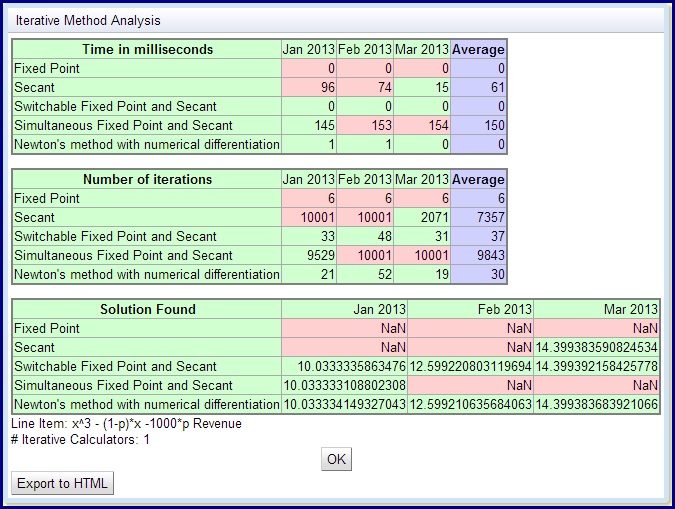
If the current method is not finding an answer or if you wish to know which method is the fastest in a certain situation you can click on "Analyze Iterative Methods" which will perform all iterative methods for a certain period (or a range of periods) and a scenario. For each iterative method you will see if a solution was found and how many milliseconds it took to find the solution. Just because a method works for a certain period and scenario does not guarantee that it will always work, so you may have to experiment to find the best method for your situation. There may also be multiple solutions and different methods might find different solutions. Some methods work fast in some situations and slow in others. An example analysis below, shows how some methods might work some of the time. Green means a solution was found, whereas red indicates the method was unable to find a solution.
Example of solving a circular reference
Consider a model in which you'd like to add 1% interest on the cash per period. What cash should be used:
- the cash at the beginning of the period,
- the cash at the end of the period,
- or an average of the two?
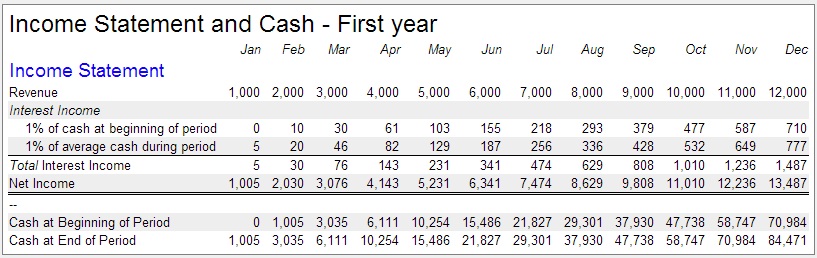
The simplest solution is the cash at the beginning of the period because no circular references are involved. The other solutions will create a circular reference because the cash at the end of the period is dependent on the net income, which is dependent on the interest income. Trying to compute the average cash during the period without circular references is very difficult. So, if it is important for modeling purposes to compute the interest on the average cash, the easiest method is to use an iterative calculator and use a simple formula (1% of (beg. cash + end cash)/2). The report below shows a simple example with one line showing 1% interest on the beginning cash and another line showing 1% interest on the average cash.
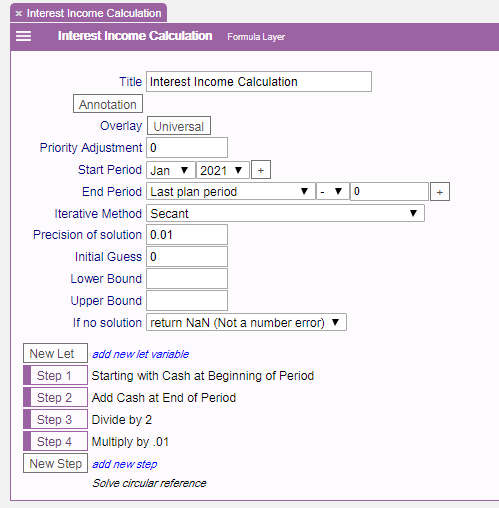
The formula layer for computing the average cash is shown below. Note that the iterative calculation has been turned on and it uses the Fixed point method with a precision of .01. After the last step, the note "Solve circular reference" is added to indicate that the value is obtained with an iterative calculation rather than a direct calculation.
Example of solving a goal seek problem
Iterative Calculations can also be inserted into the model to solve goal seek type problems on the fly. A goal seek problem is to find a value such that some formula will evaluate to some specific goal value. Break even analysis, for example, attempts to find a number such as number of units sold so that the net income is zero. To turn a formula layer into a goal seek:
- Create a formula layer in an appropriate overlay, start and end date.
- Add "Iterative Calculation for Solving Goal Seek"
- Enter values for iterative method, goal seek value, discrete value, initial guess, lower and upper bounds, and what to do if no solution is found.
- Create steps for a formula that computes the Goal value (not the solution). For example, in break even analysis (see example below), the net income should be computed.
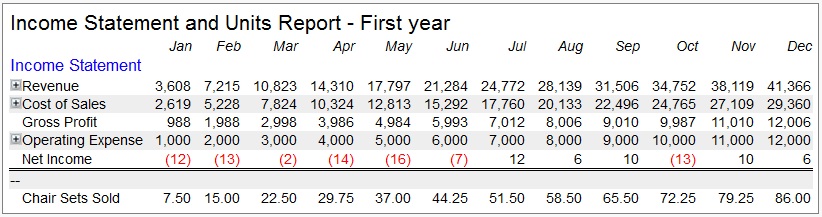
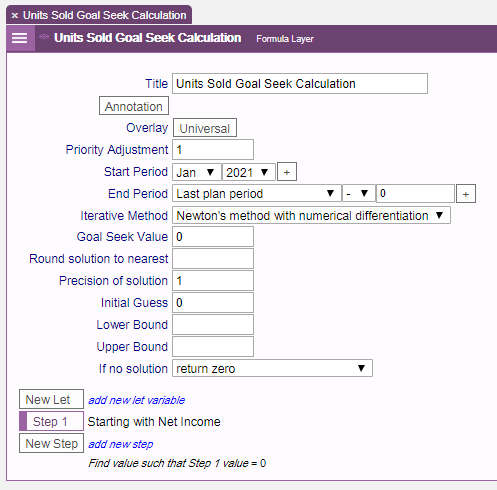
As an example, let's determine the number of chair sets we need to sell to break even. The operating expense in January starts at $1000 and increases by $1000 each month, so we need to sell a lot more chair sets in December than January. The goal seek formula needed to compute the number of chair sets that must be sold per period is:
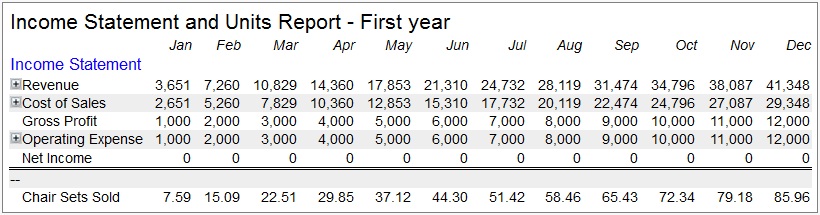
The simplified report for the solution (without any rounding) is:
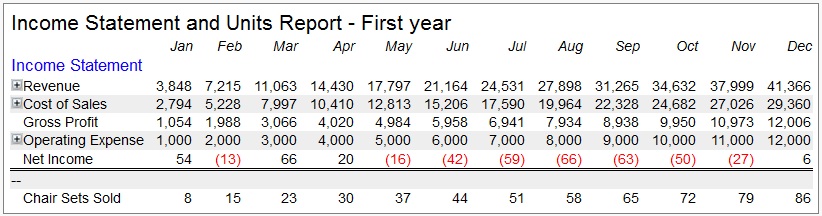
For modeling purposes it is desired to round the number of chair sets sold to a whole number. Rounding should be part of goal seeking otherwise you won't find an exact break even point. When rounding is involved, the goal seek is modified to find a value that comes closest to the goal. The report with unit rounding is shown below. Note the differences in the last two rows.
The rounding is quite flexible. If you decide that the chair sets can be sold by chair and there are four chairs in each set, then you can set the rounding to .25, and then you would obtain the following result.