Expression Operators and Functions
The following table lists the operators that can be used as part of Expressions in a formula layer. New functions can be added by using Java Functions.
| Operator | Symbol | Example | Explanation |
|---|---|---|---|
| Boolean Not | ! | if(x!=y,y,x) | if x is not equal to y, return y, otherwise return x |
| Unary Plus, Unary Minus | +x, -x | -100 | negative 100 |
| Division | / | 4/2 | 4 divided by 2 |
| Multiplication | * | 4*2 | 4 times 2 |
| Addition, Subtraction | +, - | 4+2 | 4 plus 2 |
| Less or Equal, More or Equal | <=, >= | if(x>=y, y,x) | if x is greater than or equal to y, return y, otherwise return x |
| Less Than, Greater Than | <, > | if(x>y, y,x) | if x is greater than y, return y, otherwise return x |
| Not Equal, Equal | !=, == | if(x==y,y,0) | if x equals y, return y, otherwise return 0 |
| Boolean And | && | if(x>5&&x<10,x,0) | if x is greater than 5 and x is less than 10, return x, otherwise 0 |
| Boolean Or | || | if(x<5||x>10,x,0) | if x is less than 5 or x is greater than 10, return x, otherwise 0 |
| Modulus | % | x%2 | returns 1 if x is odd, otherwise 0 |
| Modulus | mod | mod(x,y) | x modulus y (same as x%y) |
| Power | ^ | x^2 | x to the power of 2, or x squared |
| Power | pow | pow(x,y) | x to the y power (Same as x%y) |
| Not a Number | NaN | if(y==0,NaN,(x-y)/y) | if y equals 0, return - (Not a Number), otherwise return (x-y)/y. |
| If | if | see above examples | conditional expression |
| Minimum value | min | min(x,y,z) | returns the minimum value of x, y and z (any number of parameters) |
| Maximum value | max | max(100,x,y,z) | returns the maximum value of 100, x, y, and z (any number of parameters) |
| Average | avg | avg(x,y,z) | returns the average of x, y and z = (x+y+z)/3 (any number of parameters) |
| Sine | sin | sin(x) | The sine of x |
| Cosine | cos | cos(x) | The cosine of x |
| Tangent | tan | tan(x) | The tangent of x |
| Arc Sine | asin | asin(x) | The arc sine of x |
| Arc Cosine | acos | acos(x) | The arc cosine of x |
| Arc Tangent | atan | atan(x) | The arc tangent of x |
| Arc Tangent 2 | atan2 | atan2(x,y) | The arc tangent of x,y |
| Secant | sec | sec(x) | The secant of x |
| Cosecant | cosec | cosec(x) | The cosecant of x |
| Co-tangent | cot | cot(x) | The cotangent of x |
| Hyperbolic sine | sinh | sinh(x) | The hyperbolic sine of x |
| Hyperbolic Cosine | cosh | cosh(x) | The hyperbolic cosine of x |
| Hyperbolic Tangent | tanh | tanh(x) | The hyperbolic tangent of x |
| Inverse Hyperbolic Sine | asinh | asinh(x) | The inverse of hyperbolic sine |
| Inverse Hyperbolic Cosine | acosh | acosh(x) | The inverse of hyperbolic cosine |
| Inverse Hyperbolic Tangent | atanh | atanh(x) | The inverse of hyperbolic tangent |
| Natural Logarithm | ln | ln(x) | The natural logarithm of x |
| Logarithm base 10 | log | log(x) | The base 10 logarithm of x |
| Logarithm base 2 | lg | lg(x) | The base 2 logarithm of x |
| Exponential | exp | exp(x) | e to the x power |
| Round | round | round(x) | Round value to nearest integer value |
| Round | round | round(x, y) | Round x to nearest y, e.g. round(x, .01) rounds to nearest cent |
| Floor | floor | floor(x) | Largest integer value smaller than or equal to x |
| Ceiling | ceil | ceil(x) | Smallest integer value greater than or equal to x |
| Absolute value | abs | abs(x) | The absolute value of x |
| Square Root | sqrt | sqrt(x) | The square root of x |
| Normal S Distribution | normsdist | normsdist(x) | The normal S distribution for x |
| Net Present Value | npv | npv(x_lineitem, .1,context) | The net present value of the line item x with a discount rate of 10%. |
| Payment | pmt | pmt(interest_rate, nper, present_value) | Calculates the payment for a loan based on constant payments and constant interest rate. The following parameters are needed: Interest Rate, Number of Periods, and Present Value. Note: Excel optional parameters: fv (future value) or type are not currently supported. |
| Internal Rate of Return | irr | irr(x_lineitem,context) | The internal rate of return of line item x. |
| Modified Internal Rate of Return | mirr | mirr(x_lineitem, finance_rate, reinvest_rate, forecast_period_end, context) | The modified internal rate of return of line item x. The following parameters are needed: Cash flow, Finance Rate, Reinvest Rate, Forecast Period End |
| Day, period, and Calendar functions | |||
| Period | period | period(day,context) | The fiscal period of a day (first period of model=1, 2nd period=2, ...) |
| First day of a period | firstday | firstday(period,context) | The first day of a period (first day=1, 2nd day=2, ...) |
| Last day of a period | lastday | lastday(period,context) | The last day of a period |
| Year | year | year(day,context) | The calendar year of a day (which may be different from the fiscal year) |
| Month | month | month(day,context) | The calendar month of a day |
| Day of month | dayofmonth | dayofmonth(day,context) | The calendar day of a month |
| Day of week | dayofweek | dayofweek(day,context) | The day of week (Sunday=1, Monday=2, ...) |
| Day of model | dayofmodel |
dayofmodel(year,month, dayofmonth,context) |
The day in the model (first day of first period=1, each subsequent day is 1 more than the previous day) |
| Today | today | today(context) | Returns the number of days since the start of the model |
| NA Date | isNADate | isNADate(x,context) | Returns true if x is a NADate. |
Day, period, and Calendar functions
Period values are represented by numbers, with the first period in the model represented by 1, and each subsequent period one more than the previous. Day values are also represented by numbers, with the first day in the model represented by 1, and each subsequent day one more than the previous. The functions "period", "firstday" and "lastday" are used to convert between days and periods. The remaining calendar functions are used to convert between days and calendar years, months, day of month, and day of week (as distinct between fiscal periods and fiscal years). Day values outside the time range of the model can be used, but conversions between such days and periods might be approximations as the software may estimate what the period would be if the model were extended to those dates.
Net Present Value
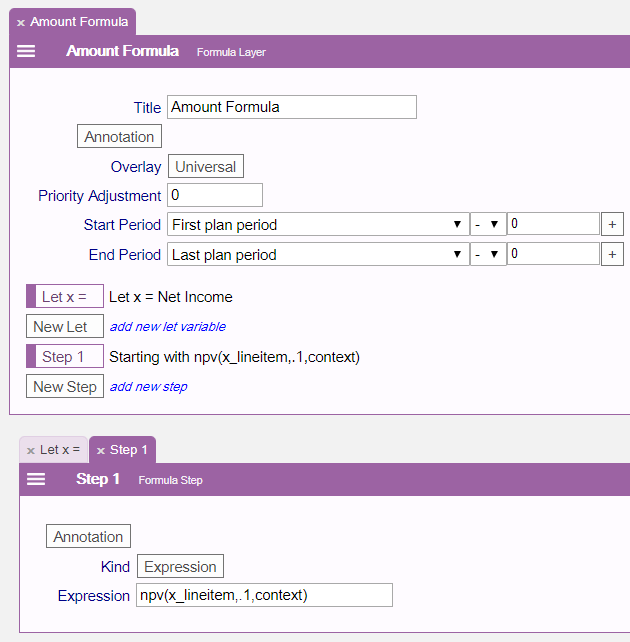
The npv function computes the net present value of any "cash flow" line item (such as net income). The required parameters are
- The cash flow line item. First create a let statement that refers to a line item. To pass the line item associated with the let statement, pass the let variable name appended with "_lineitem".
- The annual discount rate used to compute the discounted cash flow over time.
- The context, which is a parameter that passes the required information to compute the values of the cash flow line item, as well as details about the computation such as the current period and scenario.
Unlike Excel, the year 0 cash flow is not discounted but all subsequent periods are.
In addition to the required parameters one additional parameter can be passed
- The number of periods to discount. The default is to use all the periods up to the last period of the model.
Internal Rate of Return
The irr function computes the internal rate of return for any "cash flow" line item. It is defined as the discount rate such that the net present value is zero. The parameters are:
- The cash flow line item. First create a let statement that refers to a line item. To pass the line item associated with the let statement, pass the let variable name appended with "_lineitem".
- The context, which is a parameter that passes the required information to compute the values of the cash flow line item, as well as details about the computation such as the current period and scenario.
The irr function also has two optional parameters:
- Initial guess. By default the initial guess is 0%.
- The number of periods to consider. The default is to use all the periods up to the last period of the model.
The irr function will not always be able to compute a value in which case NaN (Not a Number) will be returned.