Annotations
Annotations can be added to objects A generic term referring to any part of the model that can be modified independently of another throughout the model. They can contain:
- Notes
- Attached documents
Notes
Notes can contain comments concerning the object including rationale for calculations, instructions, or as a record of changes made to model.
To add a note:
- For any object, click on and then select .
- A text area will appear allowing you to type in pertinent comments.
- Click when finished.
To easily edit an existing annotation, simply click into the field.
Attached Documents
Documents can be attached as a reference.
To attach a document:
- For any object, click on and then select .
- A dialog box will appear allowing you to select the document you wish to attach.
- Click
- A button with a link to the file will be displayed. Clicking on this button will allow you to download the file.
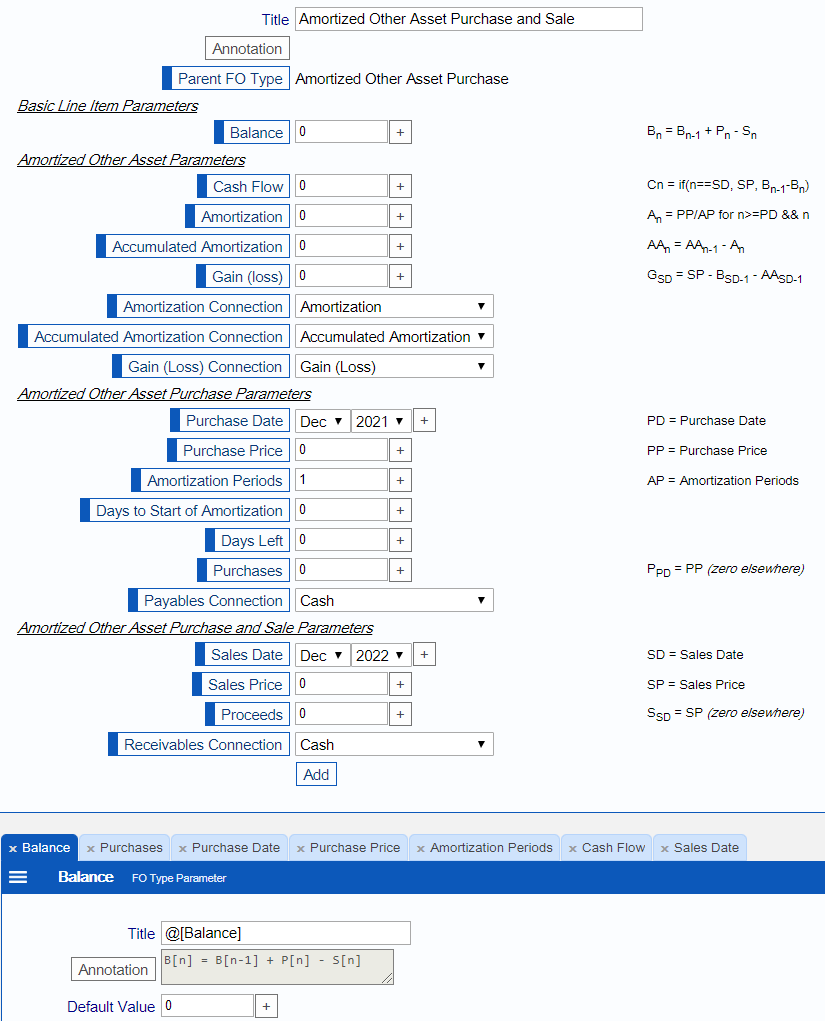
FO Type Parameter Annotations
The first line of the annotation in a FO Type Parameter is used to document the FO Type panel, making it easy to summarize the purpose or computation for each line item. Square brackets are translated to subscripts and can be used to denote the period for line items. In the example below, look first at the very bottom to see how the Balance line item is annotated and then how that is translated to the comment on the far right in the FO Type panel.